Plexus Pad Prototype
Multi-agent control deck · prototype in build

One pad. Every agent. Every machine.

Plexus Pad is a desk device for people who run several AI agents on several computers. Press a key to start a workflow on any machine, read each agent's status in the key's own light, and switch hosts without reconnecting anything.

14 hot-swap keys 2 knobs WiFi · BLE · USB-C 2× USB-C ports Free local gateway
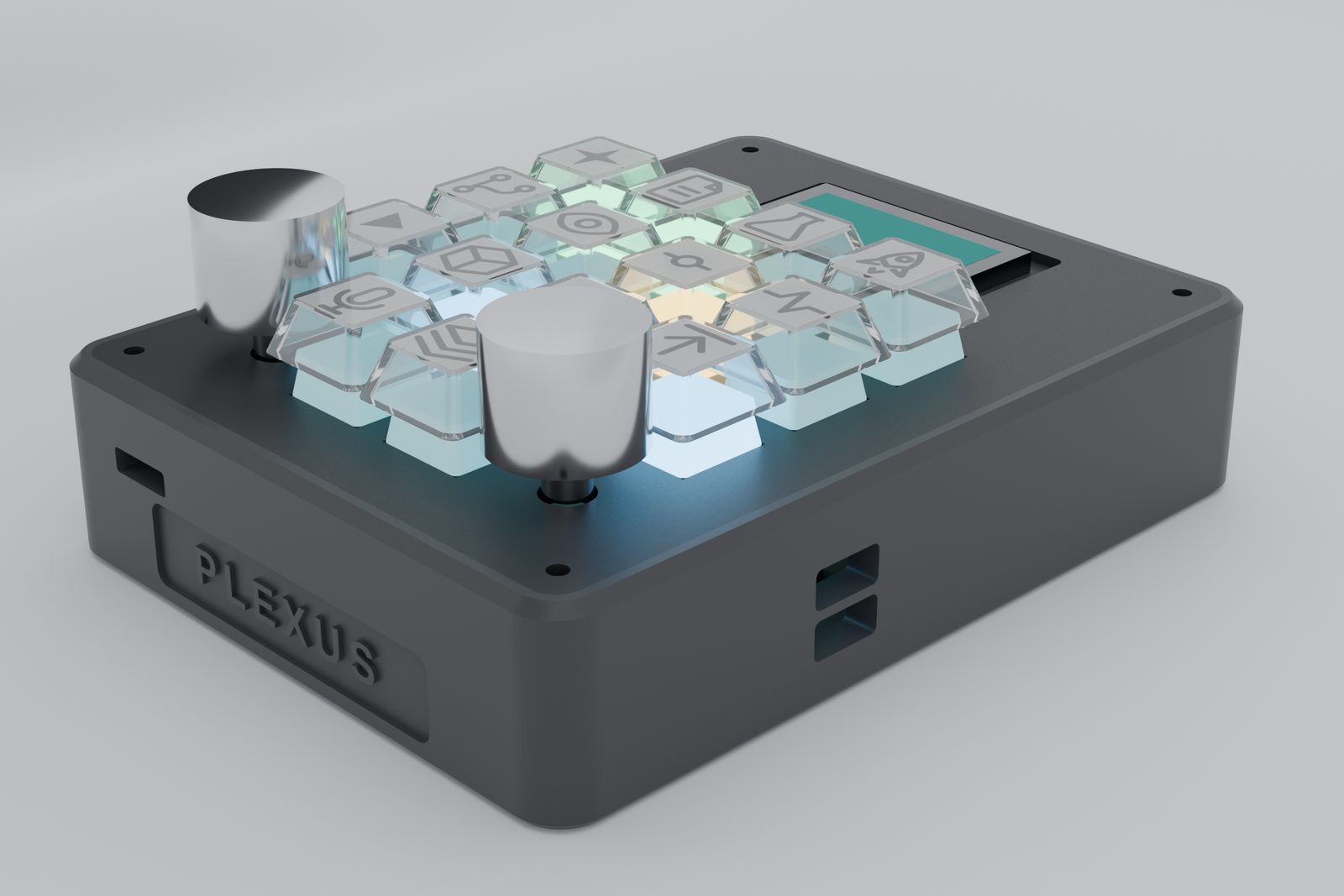
PLEXUS PAD · BENCH PROTOTYPE CAD render · not a photograph
Render of the Plexus Pad: dark graphite case, sixteen-key grid of clear keycaps with icon legends lit from below, two machined aluminium knobs and a small status screen.
Keys
14 + 2 knobs
Footprint
94×132 mm
Core
Pi Zero 2 W
First-batch target
$199
Why it exists

Your swarm doesn't live in one window.

Power users run Claude Code, shell automations and tool servers across a laptop, a desktop and a Mac — and lose time to alt-tabbing between them. A single-agent, single-machine deck can't fix that. This one is built around the swarm.

Many agents

ONE KEY = ONE INTENT

Each key is bound to a prompt, slash-command, shell command or named workflow in a plain-text config. Layers called Circles multiply the keys you have.

Today: Claude Code + shell actions work. MCP and HTTP actions are planned.

Many machines

A GATEWAY ON EACH HOST

Pair once with each computer. Switching targets is a pointer move on the pad — no re-pairing, no reconnect. Broadcast a key to several hosts at once.

Tested: two paired hosts in one session, with transport failover.

Real status

THE KEY TELLS YOU

Each key's light shows what its agent is doing: idle, working, waiting for your confirm, done. The label comes from what the agent is actually running, not a guess.

Key light: idle · working · confirm · done
The suite

One controller, a few clip-ons, and the software that ties them together.

Hardware and software are developed together. The status tag on each card says exactly how far along it is — nothing here is shipping yet.

ControllerBench prototype · parts not yet bought

Plexus Pad

The base deck: 14 hot-swap keys with clear relegendable caps, two machined-aluminium knobs, per-key RGB, a Raspberry Pi Zero 2 W brain with an RP2040 input co-processor, two USB-C ports and an aux jack. WiFi, Bluetooth and USB-C are all first-class links to your machines.

$229 target retail · $199 first batchHardware details →
SoftwareBuilt · 121 tests pass

Aether

The free local gateway that runs on each machine. Pairs the pad, runs the actions, and streams status back. A virtual pad lets you try it with no hardware.

Free
Add-onSpecified · not built

Oculus

A toolless snap-on status screen: agent name, task, elapsed time and last output line, for when a key light isn't enough.

$49–69 target
Add-onSpecified · not built

Vox

A tiny, replaceable audio puck: mic and speaker for push-to-talk commands and hearing agent output read aloud. Speech processing runs on your computer, not in the puck.

$29–39 target
KeycapsIcon art drawn · print test next

Sigils

Icon keycap sets: monoline glyphs on printable inserts under clear MX-compatible caps. A printable sheet is generated straight from your config.

$19–29 per set, target
ConfigWorking format

Grimoire

Plain-text (YAML) bindings for keys, knobs and layers, per host and per profile. Keep it in git; sync it like any other dotfile.

Free
LayersIn the protocol

Circles

Layers of key bindings — the target is at least six — switched with a key or a knob press, so fourteen keys become a lot more.
Included
How it works

Press, route, run, report.

  1. 01 PRESS

    A key or knob event leaves the pad

    Over whichever link is healthy — WiFi, Bluetooth or USB-C. Each machine has an ordered list of links; if one stalls, the pad moves to the next.

  2. 02 ROUTE

    The pad's session table picks the host

    Switching target machine is a pointer move, not a reconnect. Broadcast sends one key to several hosts.

  3. 03 RUN

    That host's Aether gateway resolves the key

    Its own Grimoire maps the key to a concrete action — start Claude Code on a prompt, or run a shell command. Risky keys can require a second press.

  4. 04 REPORT

    Status streams back to the key's light

    Working, waiting for confirm, done or error — with a short human label such as "Read daemon.py".

Security, plainlyPairing uses a one-time code and issues a per-host secret token; commands only run if your own Grimoire allows them. Today the link is plain TCP on your local network — encryption (TLS) is on the roadmap, so treat it as a trusted-LAN device for now.
PLEXUS PAD LaptopAether · Grimoire DesktopAether · Grimoire MacAether · Grimoire WiFiUSB-CBluetooth
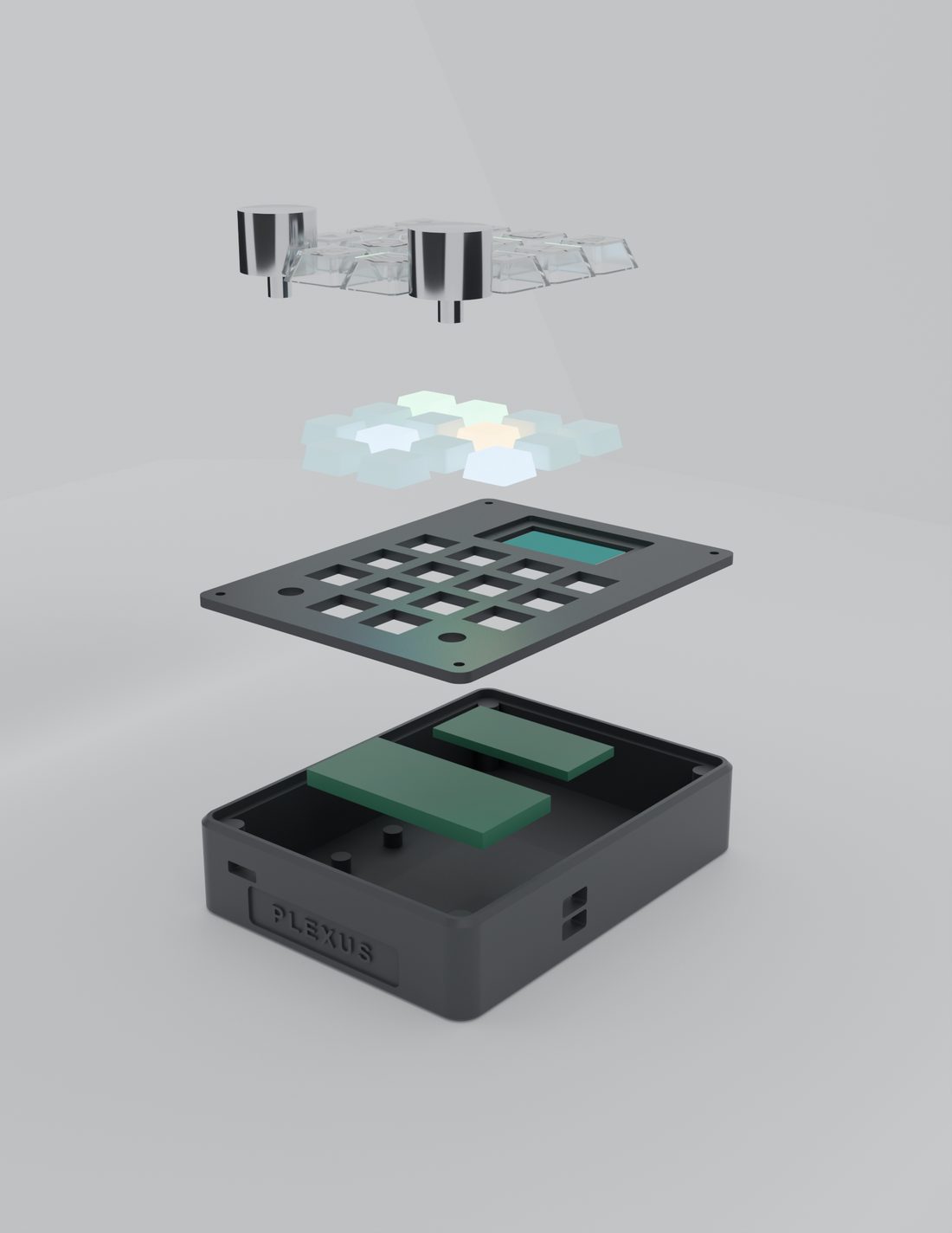
Exploded render of the Plexus Pad showing, from top: knobs and clear keycaps, key switches, switch plate with screen window, and the case holding the boards.
EXPLODED VIEW · CAD render of the bench prototype
Hardware

Built from real, sourced parts.

The prototype is specified against actual catalogue parts, so the renders on this page show what the bench build will really look like.

  • BRAIN

    Raspberry Pi Zero 2 W + RP2040

    Linux handles concurrent secure sessions, Bluetooth and voice; the RP2040 owns real-time key scanning, knobs and lights.

  • KEYS

    14 hot-swap MX-style switches

    Milky Gateron KS-3 Yellow Pro under clear relegendable DSA caps with printed icon inserts.

  • LIGHT

    Per-key SK6812 RGB

    Under each switch, so the glow genuinely travels up through the cap and its icon.

  • KNOBS

    Two 20 mm machined-aluminium knobs

    On Bourns PEC11R encoders with press-switch.

  • CASE

    94 × 132 × 32 mm, 3D-printed first

    Parametric OpenSCAD model; FDM prototype in PLA, tooling later.

Honest status

What works today — and where it stops.

This is a pre-hardware project. Here is exactly what exists.

Working now

  • Aether gateway: pairing, per-host tokens, Claude Code and shell actions, status streaming. 121 automated tests pass.
  • A virtual pad drove two local daemons at once, including broadcast and automatic failover between links.
  • Full parametric CAD, 2D plate drawing and photoreal renders of the pad.
  • A sourced parts list and a ready-to-place prototype parts order.

Not yet — said plainly

  • No physical unit exists yet. The parts for the first prototype have not been purchased; every image here is a render.
  • The gateway has run against local test daemons; it has not yet been run on a second real computer.
  • Link encryption (TLS) is not built; use on a trusted network only.
  • Voice (Vox), the Oculus screen, and MCP/HTTP actions are specified but not built.
Prices and dates are targets. Everything here is design-basis until a unit exists.
Planned lineup & pricing

Priced to sit level with single-agent decks.

The base pad is targeted at $229, with a $199 first-batch price for early backers. Add-ons are sold separately so the entry price stays honest. These are targets, not offers — there is no checkout and the waitlist is not an order.

ProductWhat you getStatusTarget price
Plexus PadBase controller — keys, knobs, tri-link, 2× USB-CBench prototype$229 ($199 first batch)
OculusSnap-on status screenSpecified$49–69
VoxAudio puck — mic + speakerSpecified$29–39
SigilsThemed icon keycap setArt drawn$19–29 / set
Aether + GrimoireGateway software and config formatBuilt (v0)Free
Waitlist

Be first to know when there's a pad to hold.

Join the list for build updates, the first-batch window, and early access to the gateway software. No payment is taken.

Updates only — no spam. This is a pre-launch project; joining is not an order or a commitment. We use your details solely for these updates, never sell them, and delete them on request.